

01
Access cards and keys
People can get in and out with someone else's card or a password they happen to know. Lost or forgotten cards and keys keep people out, and managing cards, keys, and passwords also adds cost.
Face recognition with no apps, no dedicated devices, and no cards.
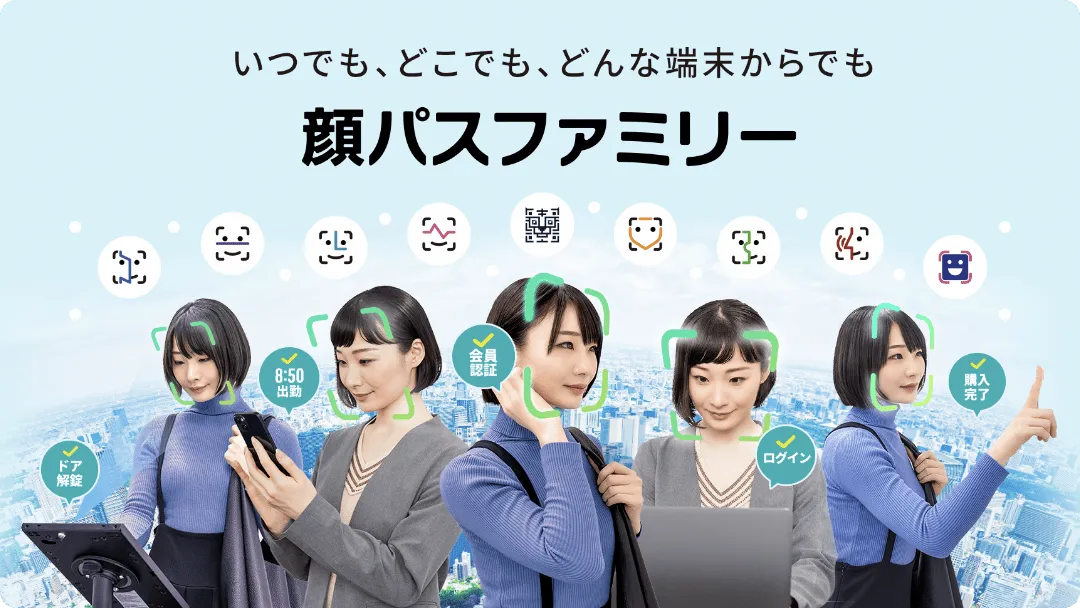
KAOPASS Family is face recognition that runs in real time in a browser.
It works on smartphones and tablets, with no need for dedicated devices or IC cards.
Use it for face-based entry and exit management, attendance clock-in, stress checks, web login authentication, and more.
KAOPASS Family is a new biometric authentication solution that reduces costs and improves operational efficiency, with no apps, no dedicated devices, and no cards.
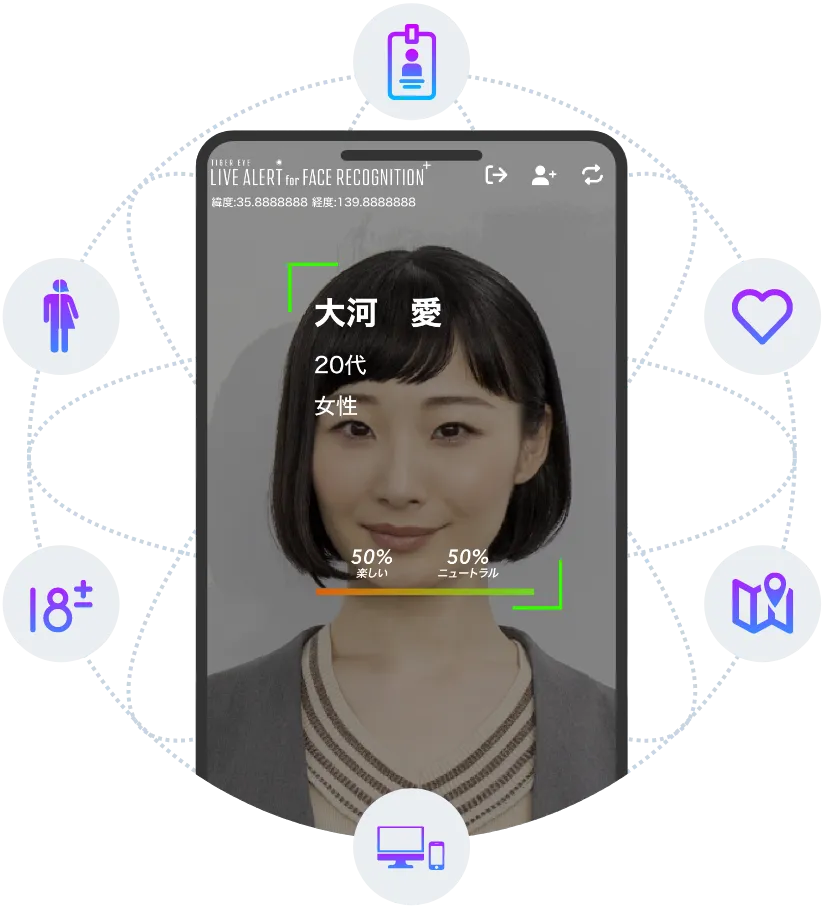
Because its real-time face recognition runs in a browser rather than an app, users can start using face recognition right away without downloading an app. Multiple AIs also run simultaneously in real time, so face recognition and estimation of age, emotion, and more can be performed at the same time.
Checking and recording people at the entrance takes effort.
01
People can get in and out with someone else's card or a password they happen to know. Lost or forgotten cards and keys keep people out, and managing cards, keys, and passwords also adds cost.
02
When managing attendance for on-site work where PCs are not provided, handwritten attendance records cost workers time and effort and lead to human error. Fraudulent clock-ins by other people also happen.
03
Forgetting IDs and passwords, and typing them in again and again, is stressful. Two-step authentication and login ID checks to confirm identity add steps for both users and administrators.
Real-time biometric authentication with just a browser.
Gender, age, and emotion estimation are also available.
01

A service that lets people prove their identity easily with just their face, without preparing cards, apps, or dedicated devices. Simply scan a QR code or use a smartphone or tablet set up on site, and face recognition starts to identify and authenticate the person.
02

Clock in with face recognition for secure, smart attendance management. No cards or dedicated devices are needed, and employees can clock in easily from their smartphones. Only the employees themselves can clock in.
03

A solution that handles employee attendance clock-in and health management at the same time, simply by recognizing their faces. Stronger security, more efficient attendance management, and better employee well-being.
04

A product that enables login by building face recognition OAuth 2.0 into SaaS services. It offers a way to log in that replaces email addresses and passwords.
05

Link face recognition with smart keys and electric locks to easily set up doors that unlock with face recognition alone. Room entry and exit management and unstaffed room guidance are possible without cards or apps.
TIGEREYE Inc. KAOPASS Attendance service introduction
KAOPASS Attendance: tablet authentication demo at a construction site
KAOPASS Key & Entry/Exit: in-store demo of unlocking a smart key with QR code authentication
KAOPASS Key & Entry/Exit: QR code authentication demo
KAOPASS Key & Entry/Exit: tablet authentication demo
KAOPASS Key & Entry/Exit: security camera authentication demo
This example uses KAOPASS QR.
Send registration invitations easily by email or from a device you already have.
Register a face easily on a staff member's or the user's own smartphone or tablet by following the registration guide.
Launch the authentication screen with a dedicated QR code or on a smartphone or tablet, and verify the person's identity quickly.
01
Because its real-time face recognition runs in a browser rather than an app, users can start using face recognition right away without downloading an app.
02
Multiple AIs run simultaneously in real time, so face recognition and estimation of age, emotion, and more can be performed at the same time.
03
Combine security settings such as two-step authentication, false authentication prevention, and Dynamic Schedule, for example to raise authentication strength at night, on weekends, and during unstaffed hours.
TIGEREYE SECURITY SOLUTION
We provide authentication that lets you change the security strength by switching settings to match how you operate and the security level you need.
TIGEREYE SECURITY SOLUTION combines multiple security factors in real time and scores authentication results numerically to provide optimal security for each situation. It raises the recognition rate in actual use above the typical AI recognition rate (which is affected by distance, brightness, camera angle, and other factors). Customers can configure the settings as they wish, based on how the service is operated.
TIGEREYE SECURITY SOLUTION comes standard with all products.

Strong security has traditionally come at the expense of convenience. With TIGEREYE SECURITY SOLUTION, you can customize security layers, security rules, and scoring factors (in three categories) to choose the best security measures.
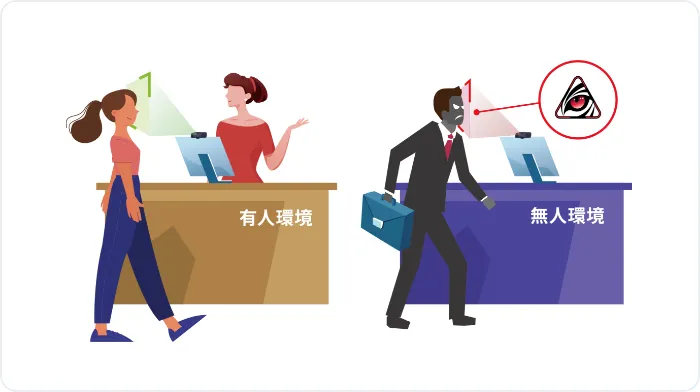
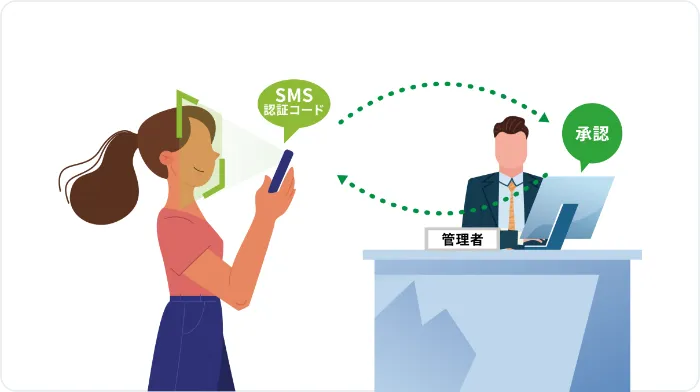
For example, you can configure settings to suit your operations and situation: simple face recognition when staff are nearby, and, where there is no third-party oversight, technology that prevents photo spoofing, two-step authentication, or an administrator approval process.
It can also decide whether to allow authentication based on image quality, maintaining a high recognition rate.
01
02
03
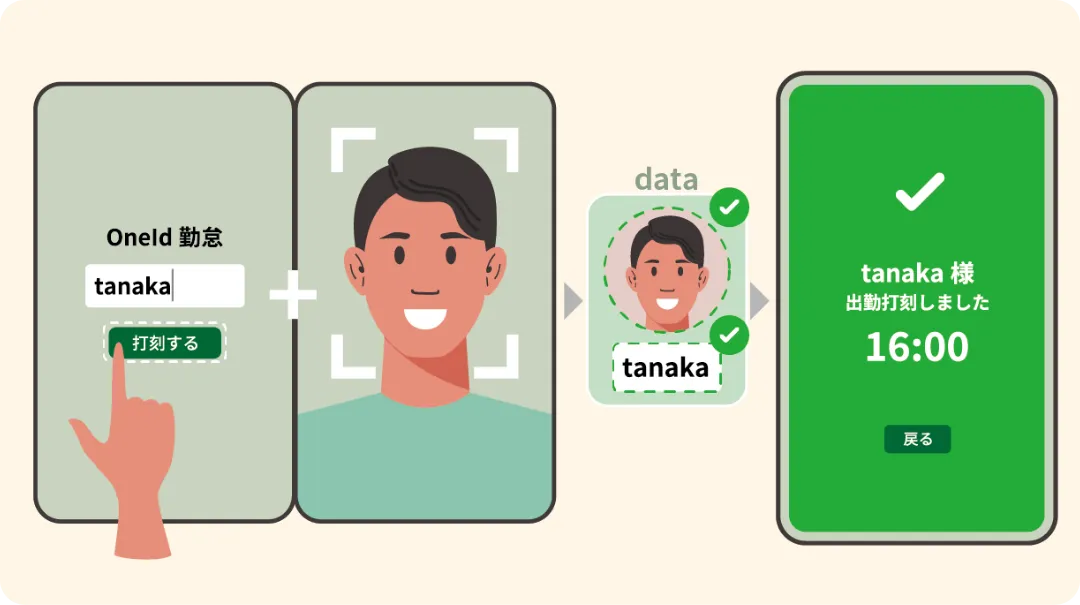
1:1 authentication compares the face image captured at the time of authentication, one to one, with the face data linked to the person's pre-registered ID.
Rather than picking out a person from a large, unspecified group, it focuses on confirming whether the person is the owner of this ID, which reduces the risk of false matches with people who look similar, such as twins.
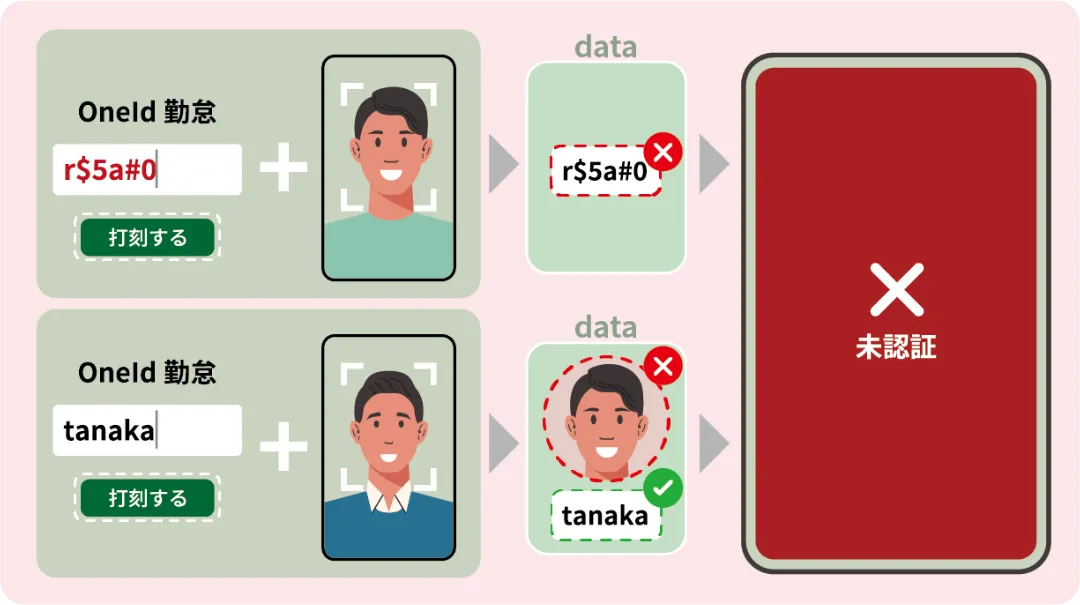
Authentication is completed only when the captured face image matches the person's face data and the corresponding ID is confirmed. If the OneID does not exist, or the face data does not match the OneID, the attempt is treated as unauthenticated.
Face recognition is a highly convenient technology, but where strong identity assurance is required, the choice of authentication method itself becomes important.
In these situations, authentication succeeding merely because a face resembles someone else's is a major risk. 1:1 authentication does not allow authentication to succeed if the person's ID does not exist or the face data does not match.
TIGEREYE's 1:1 authentication is built into our security design, not offered as a standalone feature. This delivers identity verification that balances strictness with practical operation.
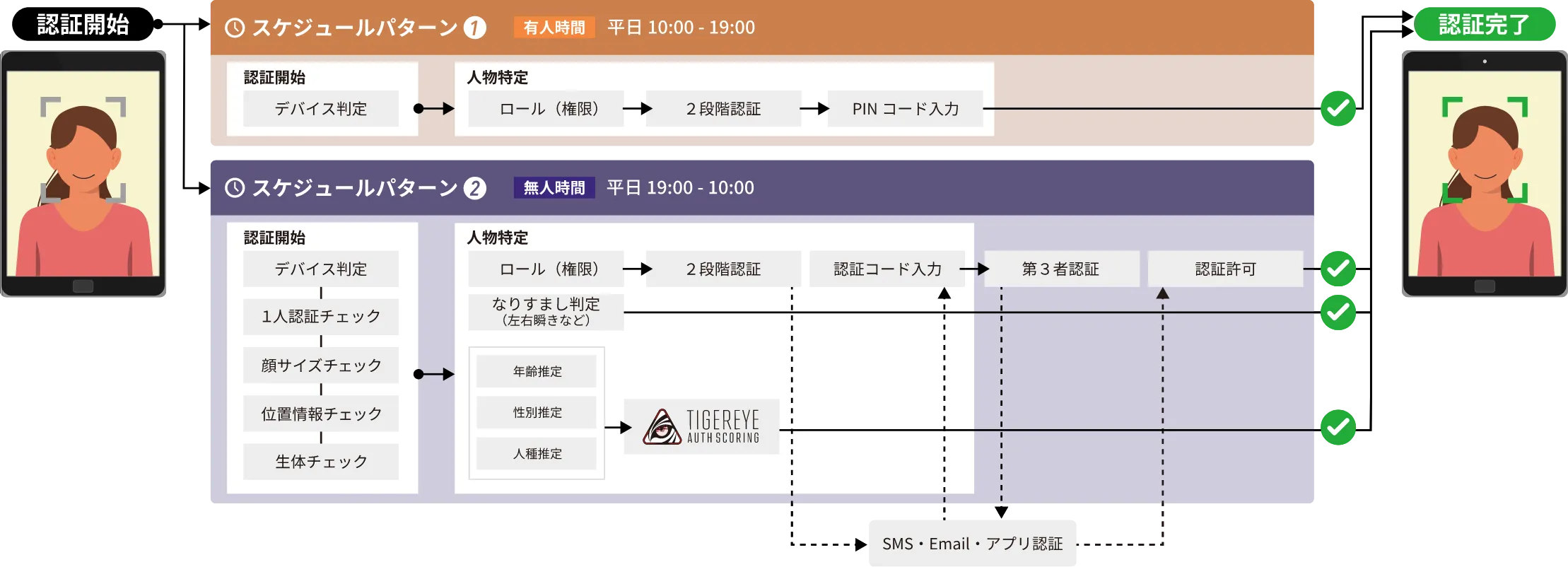
You can freely set schedules, such as raising authentication strength at night, on weekends, and during unstaffed hours.
For example, you can configure settings to suit your operations and situation: simple face recognition during hours when staff are nearby, and, where there is no third-party oversight, technology that prevents photo spoofing, two-step authentication, or an administrator approval process.
It can also decide whether to allow authentication based on image quality, maintaining a high recognition rate.
We will continue to add more security items.
01

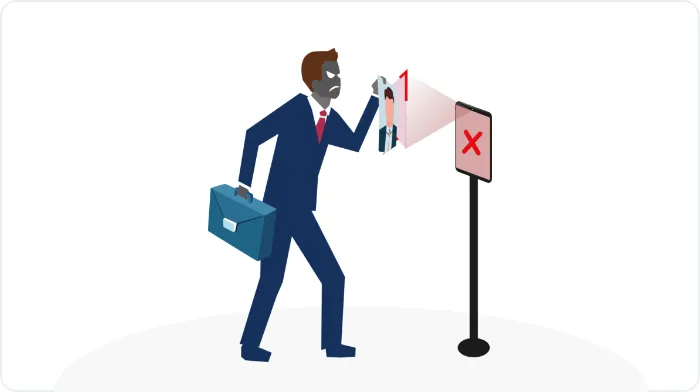
Prevents spoofing with still images (photos).
02

Includes features that raise the recognition rate, and you can switch settings to strengthen security to the level you need.
03

Multi-factor authentication, including two-step authentication with an authentication code, approval by an administrator, SMS/email/third-party (administrator) authentication, and third-party authenticator apps
04

Evaluates multiple factors and assigns a trust score in real time.
We provide advanced authentication for a wide range of situations, from entry and exit management matched to the security level of each location to strict prevention of impersonation in university entrance exams.
01
Case 1
For managing entry on weekends and holidays when the company is closed.
When someone uses face recognition at the office entrance, the administrator is notified and can see who is in the office. Alternatively, only people the administrator has approved can enter.
02
Case 2
As a reliable way to verify identity for entrance exams, regular exams, and more.
Students enter using face recognition, and seat numbers are linked with face data to see who is present and who is absent. Exits are also recorded, making it possible to find anyone without an entry record.
03
Case 3
For managing entry to areas that only certain people may enter.
The administrator is notified when face recognition is performed.
04
Case 4
For managing entry at the building entrance.
Not only residents but also visitors such as delivery workers can unlock the door with face recognition. Temporary visitors can also trigger a notification to the administrator.
| Item | Per-use authentication | Continuous authentication | |||||||
|---|---|---|---|---|---|---|---|---|---|
| Webcam | WebView (iOS / Android) | Webcam (local face detection) | Surveillance camera (local face detection) | ||||||
| KAOPASS Attendance | KAOPASS Key & Entry/Exit | KAOPASS Auth | KAOPASS QR | KAOPASS Auth | KAOPASS Key & Entry/Exit | KAOPASS QR | KAOPASS Key & Entry/Exit | ||
| Authentication settings | AI settings | Supported | Supported | Supported | Supported | Supported | Supported | Supported | Supported |
| Number of authentication attempts | Supported | Supported | Supported | Supported | Supported | Supported | Supported | None | |
| Authentication timeout | Supported | Supported | Supported | Supported | Supported | None | None | None | |
| Authentication interval | Supported | Supported | Supported | Supported | Supported | Supported | Supported | None | |
| Face size (bounding box) | Supported | Supported | Supported | Supported | Supported | Supported | Supported | None | |
| Number of registered images | Supported | Supported | Supported | Supported | Supported | None | None | None | |
| GPS setting (on/off) | Supported | Supported | Supported | Supported | Supported | Supported | Supported | None | |
| Webhook | Supported | Supported | Supported | Supported | Supported | Supported | Supported | Supported | |
| 1:N authentication | Supported | Supported | Supported | Supported | Supported | Supported | Supported | Supported | |
| 1:1 authentication | Supported | Supported | Supported | None | Supported | None | None | None | |
| Security solution | Device settings | Supported | Supported | Supported | Supported | Supported | Supported | Supported | None |
| Authentication range (GPS) | Supported | Supported | Supported | Supported | None | Supported | Supported | None | |
| Front-facing authentication | Supported | Supported | Supported | Supported | Supported | Supported | Supported | None | |
| Single-person authentication | Supported | Supported | Supported | Supported | Supported | Supported | Supported | None | |
| Authentication image storage | Supported | Supported | Supported | Supported | Supported | Supported | Supported | None | |
| Authentication area restriction | Supported | Supported | Supported | Supported | Supported | Supported | Supported | None | |
| Dynamic Schedule | Supported | Supported | Supported | Supported | Supported | Supported | Supported | None | |
| Liveness detection | Supported | Supported | Supported | Supported | Supported | Supported | Supported | None | |
| Two-step authentication (every authentication) | Supported | Supported | Supported | Supported | Supported | Supported | Supported | None | |
| Two-step authentication (insufficient brightness) | Supported | Supported | Supported | Supported | Supported | Supported | Supported | None | |
| Two-step authentication (gender mismatch) | Supported | Supported | Supported | Supported | Supported | Supported | Supported | None | |
| Two-step authentication (age mismatch) | Supported | Supported | Supported | Supported | Supported | Supported | Supported | None | |
| Third-party authentication | Supported | Supported | Supported | Supported | Supported | Supported | Supported | None | |




Toward workplaces where AI is simply part of everyday work.